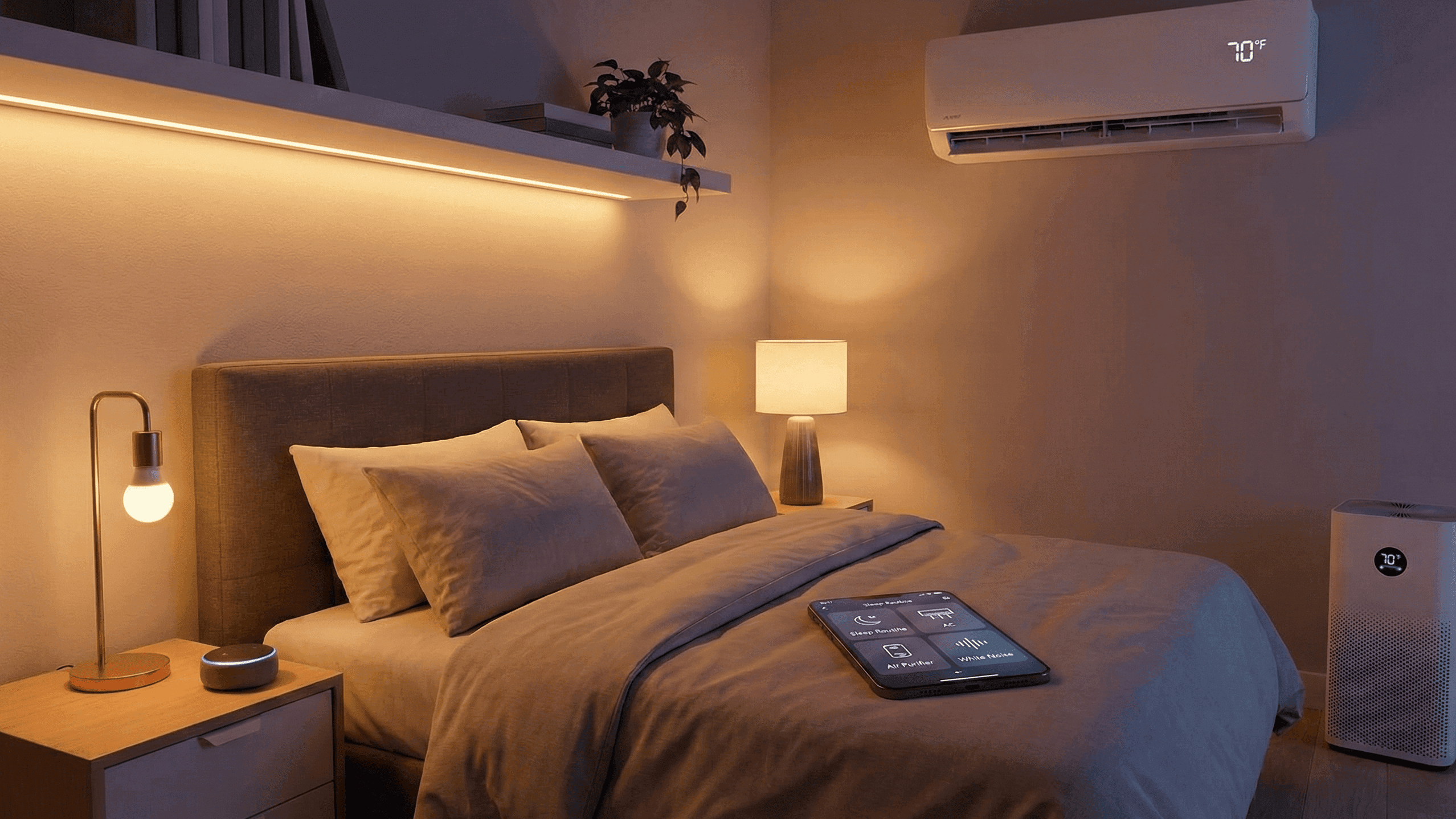
Smart Bedroom Setup: Lights, AC, Noise and Air Working Together

I spent the first year of my smart home journey focused almost entirely on the living room. That is where guests see things. That is where the voice assistant sits and the entertaining happens. The bedroom got a single smart bulb and an afterthought.
Then I had a genuinely rough stretch of sleep, about three weeks of waking up too early or not feeling rested despite getting enough hours, and I started paying attention to the conditions in my bedroom rather than just the tech in my living room. The temperature was wrong. The light in the morning was too harsh. The air was stale in a way I had stopped noticing. None of it was dramatic, but all of it was affecting me.
Over the following two months I built out a proper smart bedroom setup. Not an expensive one, not a complicated one, but one where light, temperature, air quality and sound actually work together instead of being four separate things I manage independently. The difference in how I sleep and how I feel waking up has been more significant than almost anything else I have done with smart home technology.
This is what I built and why each piece matters.
Why the Bedroom Deserves More Attention Than It Gets
Sleep quality affects everything else. Concentration, mood, appetite, how much patience you have for the inevitable tech problems that crop up when you are building a smart home. Most people know this intellectually but do not connect it to the specific environmental conditions in their bedroom, which are actually quite controllable.
The four factors that affect sleep most directly are light, temperature, noise and air quality. Each one has a clear optimal range for most people and each one is surprisingly easy to influence without spending a lot of money. A smart bedroom setup is really just a way to stop managing these four things manually and let simple automations handle them based on time of day and your actual routine.
Lighting: Training Your Room to Know What Time It Is
Light is the single most powerful environmental signal your brain uses to regulate its sleep cycle. Bright, cool light suppresses melatonin production and increases alertness, which is exactly what you want in the morning and exactly what you do not want in the hour before bed. The problem is that most bedrooms have one light on one switch that does the same thing regardless of when you turn it on.
Smart bulbs fix this in a way that is genuinely worth the small investment. I have two bulbs in my bedroom: one in the main ceiling fixture and one in the lamp on my bedside table. The ceiling light is set to a bright, neutral white during the day, which is useful when I am getting dressed or looking for something. The bedside lamp shifts to a very warm, dim setting in the evening and stays there until morning.
The specific automation that made the biggest practical difference is the wake-up light. My bedside lamp starts at about 1% brightness at 6:30 AM and slowly rises to 50% over fifteen minutes. By the time my phone alarm goes off at 6:45 AM, my body has already started responding to the light and waking up does not feel like an interruption. I have been a difficult waker for most of my adult life. This automation has done more for my mornings than any alarm app or sleep tracking device I have tried.
The evening side is simpler. At 9:30 PM, my bedroom light shifts to warm, dim mode automatically if I have not already put it there. This is not a dramatic or obvious change, which is intentional. The goal is a gradual transition rather than a sudden switch that makes you aware the system is doing something.
For the hallway outside the bedroom, a motion sensor that triggers a very dim warm light after 10 PM handles the problem of being woken up by someone moving through the apartment and switching on bright lights. That single change eliminated a genuinely common source of disrupted sleep in my household.
Temperature: Sleeping Cooler Than You Think You Want To
Most people sleep better in a slightly cooler room than they keep the rest of their home during waking hours. The generally cited optimal range for sleep is somewhere between 16 and 19 degrees Celsius, which feels quite cool if you are used to something warmer.
I do not have precise control over my bedroom temperature because I rent and the building has central heating. What I do have is a smart IR controller for the AC unit in my bedroom, which gives me detailed control over when it runs, at what setting, and how it behaves through the night.
The automation I use: about thirty minutes before I typically go to bed, the AC switches to a cooler setting than I use during the day. When I say goodnight to the Echo, it adjusts the temperature again to my preferred falling-asleep point. Then at about 2 AM, it raises the temperature by two degrees because I tend to sleep lighter in the second half of the night and I was waking up cold before I made this adjustment. The AC switches off at 6 AM, about thirty minutes before I usually wake up.
None of these are dramatic settings. The differences between each step are small. But the cumulative effect on how I sleep through the night has been noticeable in a way I did not expect from such minor adjustments.
If you do not have a split AC, a fan on a smart plug achieves a meaningful portion of the same benefit. Fans do not lower room temperature, but they make you feel cooler by moving air across your skin, and they consume a fraction of the electricity. A fan that switches on when you go to bed and off when you wake up, with no other involvement from you, is a worthwhile place to start even if you never add anything else.
Noise: Shaping What You Hear Rather Than Silencing Everything
I live in an apartment building with moderate neighbour noise and street sound. Complete silence is not possible, and I have come to think it might not actually be ideal anyway. The sleep disruption from noise comes less from the overall sound level and more from sudden changes, a door slamming, a car alarm, raised voices in a hallway. A consistent background sound masks those variations and makes the environment feel more stable.
I use a white noise app running through a small speaker in my bedroom. It plays through the night at a low volume, just enough to take the edge off sudden sounds without being something I have to consciously listen to. I connected the speaker to a smart plug and linked it to my goodnight routine, so it starts automatically when I say goodnight and stops when my morning routine runs. I have not manually started it in months.
The specific sound I use is a low fan noise. After trying rain sounds and various other options, I found that anything with rhythm or variation kept a small part of my brain engaged. The flat, steady quality of fan noise seems to work better for me personally. This is individual though and worth experimenting with.
The other noise management piece is Do Not Disturb on both my phone and the Echo. After 10 PM, neither device makes any sounds for notifications, alerts, or non-urgent automations. The only exception I have set is incoming calls from a short list of specific contacts. Everything else waits until morning. I set this up after being jolted awake by a notification sound three times in one week and realising I could simply turn that off.
Air Quality: The Thing Most People Do Not Think About Until It Is Obvious
Bedroom air quality is something I did not take seriously until I bought a small air quality monitor out of curiosity and discovered that the PM2.5 levels in my bedroom at night were meaningfully higher than I expected, driven mostly by dust and whatever came in through the window during the day.
Running a HEPA air purifier in the bedroom has made a difference that I notice when I skip it. The air feels cleaner. I wake up less stuffy. The purifier runs on a schedule through a smart plug: on at about 8 PM on a low setting, off at 6 AM. At low speed it is quiet enough to be ignorable and produces just enough steady sound to blend with the white noise.
In humid climates, a dehumidifier running during the night can make a significant difference to sleep comfort. Humidity above about 60% makes everything feel warmer and stickier than the actual temperature suggests, which affects both comfort and sleep quality. The reverse applies in very dry climates where a humidifier helps with breathing comfort through the night.
These do not need complicated automation. A smart plug with a fixed schedule, on in the evening and off in the morning, is all that is required to run these consistently without having to think about them.
Making It All Work Together
The setup I have described has four components, but they work as one system through a pair of simple routines rather than as four separately managed devices.
My goodnight routine, triggered when I say "goodnight" to the Echo, does the following: shifts the bedroom lamp to its dim warm setting, adjusts the AC to falling-asleep temperature, starts the white noise speaker, and enables Do Not Disturb on my phone. Four things, one phrase, takes about two seconds.
My morning routine, triggered by my alarm or by saying "good morning," does the reverse: ramps the bedroom light up slowly, adjusts the AC to a more comfortable daytime temperature, stops the white noise, and disables Do Not Disturb.
Both routines took about twenty minutes to build in the Alexa app. They have run without meaningful adjustment for over a year. That is the standard I hold smart home setups to: things that keep working without ongoing attention and that I would notice immediately if they stopped.
Where to Start If You Are Building This From Scratch
If I were setting up a smart bedroom from nothing today, I would do it in this order.
One smart bulb in whatever lamp sits closest to where you sleep. Set it to warm, dim light from evening onward and a slow brightness ramp in the morning. This alone will change how you experience mornings within a week.
A smart plug for a fan or any existing climate device. Set it to run on a schedule that matches when you sleep. This is low cost and requires no configuration beyond the schedule.
A white noise source on another smart plug, if noise is something that affects you. A basic Bluetooth speaker or a cheap dedicated white noise machine both work.
An air purifier on a schedule if air quality or allergies are a concern in your home. This one is optional but the improvement it makes is more noticeable than most people expect.
Each addition takes about fifteen minutes to set up. None of them require complicated automation or significant investment. The whole setup together costs less than a single premium smart home gadget and makes more practical difference to daily life than almost anything else I have done with this technology.
I built this setup incrementally over about six months. The light automation was first and I noticed it within days. The rest followed once I understood how much the environment actually matters.


