Cable Management and Power Safety in Tiny Rooms Full of Gadgets

My desk setup at one point had a laptop, an external monitor, a USB hub, a desk lamp, a smart speaker, a router, a pair of small speakers, a phone charger, and a fan. All of it was running off a single extension lead that ran across the floor to the one available wall socket in that corner of the room. The extension lead itself was warm to the touch on warm evenings, which I told myself was normal for several months before I started actually thinking about what that meant.
It is not normal. A warm extension lead is a load warning, and in a small room full of gadgets it is the kind of signal that is easy to dismiss until you start reading about what causes electrical fires in residential settings. Most of them are not dramatic. Most of them are the cumulative result of modest overloads sustained over time.
Sorting out cable management is partly about aesthetics and partly about genuine safety, and I think the safety part gets talked about less than it should because it is less photogenic than a neatly bundled desk setup. This guide covers both.
Why Power Safety Comes Before Any Cable Tidying
Most people approach cable management aesthetically first. They buy cable sleeves and velcro ties and start bundling things before they have asked whether the underlying power setup is actually safe. The bundling is fine but it should follow the safety check, not replace it.
The fundamental question is whether your extension leads are being asked to carry more load than they are rated for. Every extension lead has a maximum current rating, which translates to a wattage limit for the combined devices plugged into it. High-draw devices like space heaters, kettles, irons, and air conditioners should connect directly to wall sockets wherever possible, not daisy-chain through extension leads with other devices. These are the items most likely to push a shared lead over its safe limit.
Low-draw devices like phone chargers, laptop chargers, small speakers, routers, and desk lamps can safely share an extension lead in most configurations. The problem arises when someone adds one high-draw device to what was previously a low-draw setup and does not account for the cumulative load.
The practical check: if your extension lead feels warm when everything is running, that is a problem. Unplug and redistribute. If it feels hot, unplug everything immediately and replace the lead before using it again. A well-loaded but within-spec extension lead should feel at most slightly warm at the plug end, not noticeably hot anywhere along the cable.
Choosing Extension Leads That Will Not Let You Down
The cheap, unbranded extension lead is one of the most common failure points in home electrical safety. The difference between a quality lead and a poor one is not always obvious from the outside but matters significantly in how it handles load over time.
Things to look for: a surge protection circuit with a reset switch, a cable that is thick relative to its length (thin cable on a long lead is a red flag), properly rated sockets rather than lightweight plastic housings, and a recognisable brand with adequate safety certifications. These are not expensive requirements. A decent extension lead from a reputable manufacturer costs only a little more than an unbranded equivalent and is worth the difference.
For a desk setup with multiple devices, a quality power strip with individually controlled sockets and energy monitoring is worth considering. Smart power strips, where each socket can be switched on and off independently via an app, also let you cut standby power to devices you are not using and monitor actual consumption, which is genuinely useful for understanding your load.
Keep liquids away from power strips. This seems obvious but a cup of coffee on a surface above an extension lead is a risk that people ignore until it becomes an incident. Designate the area around your power strip as a dry zone and maintain it.
Mapping Before Tidying
Before you buy a single cable tie, spend five minutes mapping your room. Where are the wall sockets? Which devices absolutely have to stay where they are? Which can be repositioned slightly to reduce cable runs?
The goal of this exercise is to identify whether you can cluster devices that share a power source, reducing the number of separate cable runs crossing the room. In most small rooms, having one well-positioned extension lead for the desk area, one for the entertainment area, and one for utility devices is enough to handle everything cleanly if you plan device placement around socket proximity.
Long cables crossing open floor space are both a tripping hazard and a situation where damage to the cable over time is likely as furniture gets moved and people step over them. If you find yourself with long floor runs that cannot be avoided, cable covers designed for floor use are purpose-built for this and much safer than raw cable under a rug, which traps heat and conceals wear damage.
Practical Cable Management That Actually Works
The principle that has made the most difference to my setup is grouping cables by purpose rather than trying to manage every cable individually. A desk group, an entertainment group, and a utility group. Each group gets bundled together, routed along the same path, and terminated at the same power source. The result is two or three clean bundles rather than fifteen individual strands going in different directions.
Velcro cable ties are better than plastic zip ties for any setup you expect to change. Zip ties are permanent until you cut them, which means any time you change or add a device you need to cut and replace. Velcro opens and recloses, which makes adjustments trivial. Fabric cable sleeves or spiral wrap can consolidate a bundle of three or four cables into something that looks like a single cable from a distance.
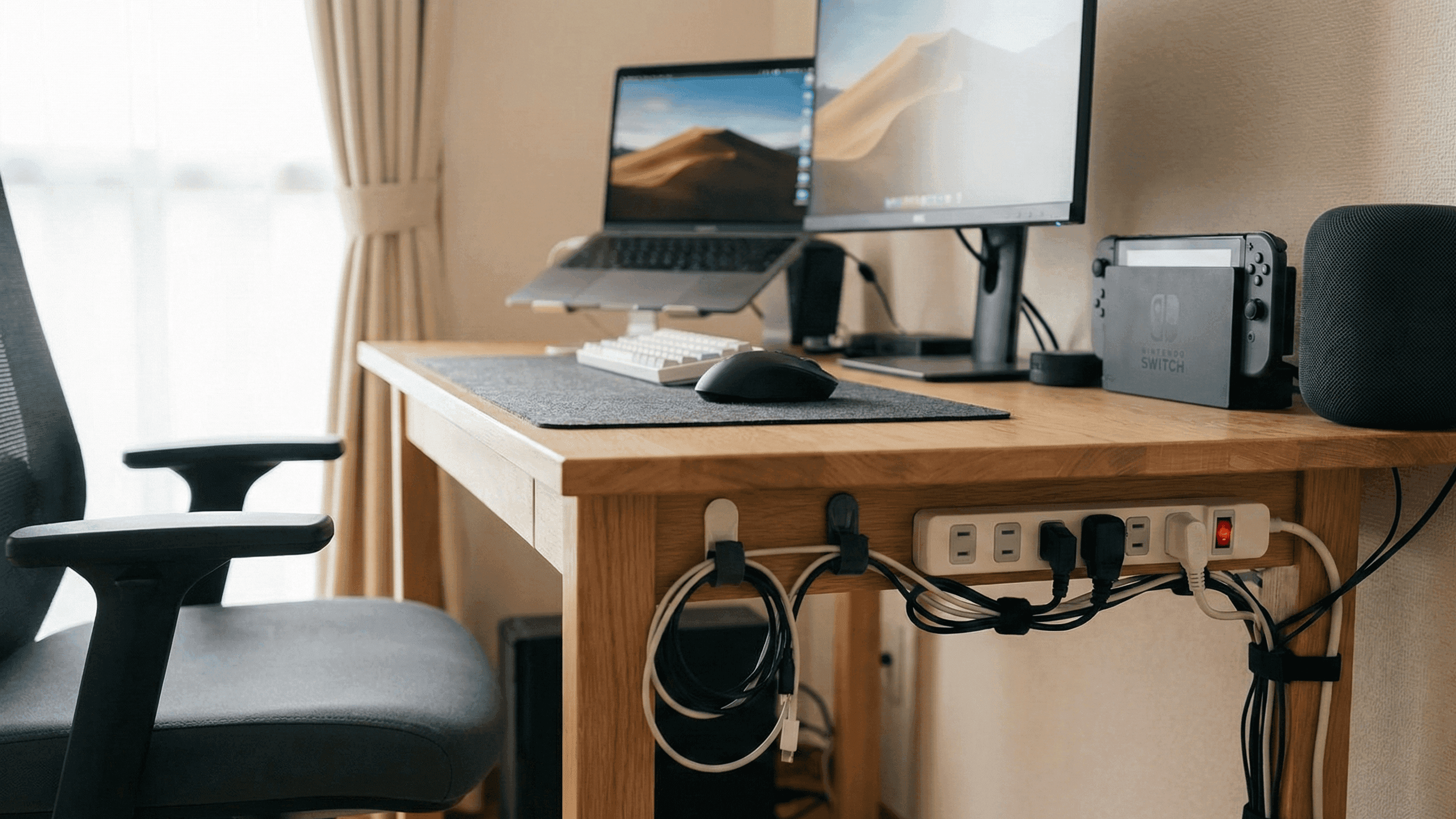
Getting cables off the floor makes an immediate visible difference and also genuinely reduces wear and tripping risk. Adhesive cable clips, available very cheaply, hold cables along the underside of furniture or along skirting boards. A small basket or tray mounted underneath a desk holds the extension lead and excess cable slack off the floor and out of sight. Stick-on cable channels along walls let you run cables from floor to desk level cleanly, particularly useful for the TV area.
The extension lead itself does not need to be visible. Mounting it on the wall below the desk with adhesive velcro, or tucking it inside a cable management box that has openings for cables, keeps it accessible without being prominent.
The Desk Specifically
Desk setups tend to be where cable chaos concentrates because that is where the most devices meet the least floor space. A few specific approaches make a consistent difference.
Fixing chargers in place rather than letting them migrate around the desk surface stops the constant annoyance of cables falling behind furniture every time you unplug something. Small adhesive cable holders along the desk edge keep charging cables accessible and in position. If you have a USB hub or docking station, mounting it under the desk surface with velcro keeps one fixed point for multiple connections and eliminates the visual clutter of cables routing from multiple points.
Cable length matters more than people realise. The standard length for most accessory cables is longer than you need in a small room. Coiling excess length and securing it neatly is better than letting it pile up, but buying cables in appropriate shorter lengths when you replace worn items is cleaner still. A 0.5 metre USB cable between a hub and a monitor looks significantly better than a 2 metre cable folded back on itself multiple times.
Wireless peripherals, specifically a wireless mouse and keyboard, remove the most frequently moved cables from the desk entirely and are worth considering if your current setup has cables that cross the work surface regularly.
The TV and Entertainment Area
The classic cable waterfall from a wall-mounted TV down to a unit full of devices is the most common aesthetic complaint in living rooms. The cleanest solution is a cable channel or raceway, a plastic channel that attaches to the wall with adhesive and routes cables internally, running from the back of the TV down to the unit below. These are cheap, available in colours that approximate common wall shades, and convert a messy hanging run into something that looks deliberate.
Labelling cables at the back of a TV unit takes ten minutes and saves hours of frustration when you need to identify something six months later. A small piece of masking tape around each cable with a permanent marker label is functional. Coloured cable ties are a slightly neater approach if you want something more permanent.
The Monthly Check
Small rooms change quickly. You add a device, reroute a cable, shove something behind the sofa. A five-minute check once a month keeps the setup from slowly reverting to chaos and catches any developing safety issues early.
Feel the extension lead while everything is running. If it is warm in a way it was not previously, something has changed and it is worth investigating. Check that no cables have been pinched by furniture being moved. Look for any visible wear on cables that are in high-movement or high-friction locations. Dust around power strips and behind furniture is a fire risk in its own right and worth clearing with a dry cloth when you spot it.
The goal is not a showroom desk. It is a safe, functional setup that you can find things in, adjust without drama, and maintain without it feeling like a dedicated project every time. That standard is achievable in any size room with a reasonable amount of planning upfront and occasional attention afterward.
I sorted out my desk setup properly about two years ago after the warm extension lead episode finally motivated me. The process took one afternoon and I have not needed to significantly reorganise it since.


