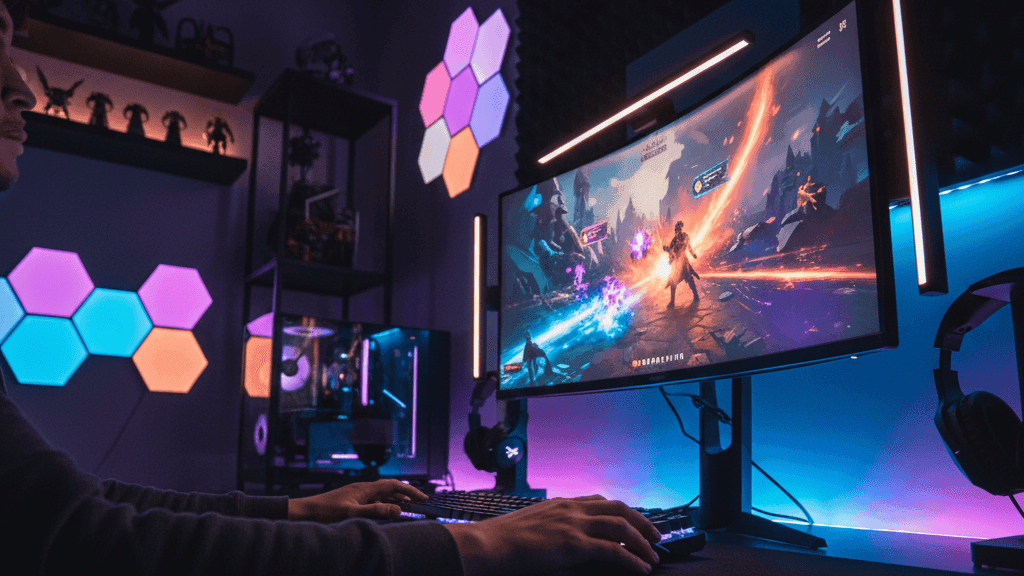
Gaming Meets Smart Homes: How to Sync Lights and Audio with Gameplay

I set up reactive lighting in my gaming space about two years ago mostly out of curiosity. I had Philips Hue lights already, I came across the Hue Sync app while looking for something else, and I spent an afternoon getting it configured to see what it actually felt like in practice.
The honest answer is that it felt better than I expected for single-player games and basically irrelevant for anything competitive. The first time I played a game with heavy weather effects and watched the lighting in my room shift in response to lightning on screen, something clicked about why people do this. It is not about being able to play better. It is about the game feeling like it occupies the room rather than just the screen.
Whether that is worth the setup effort and cost depends on how you game. This guide covers what actually works, what is more marketing than reality, and how to approach this without spending more than you need to.
How Reactive Lighting Works
There are two fundamentally different approaches and they produce meaningfully different results.
The first is screen capture. A camera or software analyses what is on your screen and extracts the dominant colours, then pushes those colours to your lights in something close to real time. The light behind your monitor turns red when a fire scene fills the screen, shifts to blue when you are underwater, flickers orange during an explosion. This works with any content on any platform because the system does not need to know anything about the game: it is just reading colours from a video signal.
The second is native game integration. The game itself sends specific signals to your lighting hardware based on in-game events. Health drops, your keyboard lights red. You pick up an item, the room flashes the corresponding colour. You use an ability, the lights pulse with it. This is more precise and more interesting because it is responding to what is actually happening in the game rather than just mirroring the colours on screen, but it requires the specific game to have built in support for the specific lighting platform.
Most setups use screen capture because it works universally. Native integration is a bonus for games that support it.
The Main Platforms and What They Are Each Good For
Philips Hue is the most mature and reliable reactive lighting ecosystem for home use. The Hue Sync desktop app, which is free, analyses your PC screen and syncs up to ten Hue lights to it in real time. The Hue HDMI Sync Box does the same thing for any HDMI source, meaning consoles work just as well as PC, which matters for PlayStation and Xbox users who do not want to route everything through a computer.
The Hue Sync Box is the better product for a dedicated gaming setup because it handles 4K 120Hz HDMI without adding meaningful latency, supports multiple inputs so you can connect a console, a streaming box, and a blu-ray player through the same box, and continues working even if your computer is off. The response time is fast enough that the lighting feels connected to what is happening on screen rather than lagging behind it.
For PC gaming specifically, the Hue Sync desktop app works well but does use some CPU resources while running. On older or less powerful machines this is occasionally noticeable. On anything built in the last four or five years it is not a concern.
Govee produces the most accessible entry point for budget-conscious setups. Their TV backlight kits include a camera that mounts above the screen, captures what is on it, and drives an LED strip that wraps around the back of the television or monitor. The result is similar in principle to the Hue approach but at a significantly lower price. The colour accuracy and response speed are not quite at the Hue level but are genuinely good enough for most casual gaming contexts.
Govee's DreamView ecosystem allows you to add additional Govee light strips and floor lamps to the same scene, so the reactive lighting extends beyond the immediate screen area into the room more broadly. For someone building a gaming setup on a budget, Govee is where I would suggest starting before deciding whether the premium Hue experience is worth the additional cost.
Razer Chroma is the most game-integrated option for PC gamers who already use Razer peripherals. If your keyboard, mouse, and headset are all Razer, Chroma syncs their RGB lighting with over two hundred games that have native Chroma support. The effects in supported games are specifically designed rather than auto-generated: your keyboard pulses with your character's ability cooldowns, changes colour based on game state, and reacts to specific events in ways that feel purposeful rather than just decorative.
Razer Chroma also integrates with other lighting brands through partnerships with Nanoleaf, LIFX, and others, allowing you to extend the game-reactive effects to room lighting. The limitation is that this is PC-only and depends on the games you play actually having Chroma support, which varies widely by title.
SignalRGB is worth knowing about as a unifying layer for PC gamers with hardware from multiple brands. It is a free Windows application that can control RGB devices from dozens of manufacturers simultaneously, Razer, Corsair, ASUS, and smart home devices including Philips Hue and Nanoleaf, from a single interface. If you have accumulated devices from different ecosystems that do not normally coordinate with each other, SignalRGB is often the most practical way to get them working together. The setup requires some initial time investment but the result is a unified lighting system that behaves as a single canvas rather than multiple uncoordinated things.
What Games Actually Benefit From This
Single-player games with strong visual identity gain the most from reactive lighting. Games with dramatic weather, strong colour palettes, distinct environmental zones, and cinematic lighting design are where you notice the room-filling effect most clearly. Open-world games with day-night cycles produce particularly good results because the gradual colour shifts across a long session are subtle enough to be atmospheric rather than distracting.
Horror games become notably more effective with reactive lighting, particularly in a room where the main illumination is from the game-responsive lights. The darkness and sudden flashes that the genre relies on feel less contained to the screen. Whether this makes horror games more enjoyable is individual, but it absolutely makes them more intense.
Competitive multiplayer games are where reactive lighting adds the least and takes away the most. Fast-paced games where accurate screen reading matters should not have your room lighting doing distracting things in your peripheral vision. Most people who use reactive lighting for competitive games either set it to a very low intensity or disable it entirely during ranked sessions.
Audio Integration: Realistic Expectations
Reactive audio is technically more complex than reactive lighting and the practical results are more limited. The core issue is latency: routing game audio through smart speakers introduces a delay that ranges from noticeable to significant depending on the speakers, and that delay makes the audio feel disconnected from the action on screen.
Smart speakers like Amazon Echo and Google Nest introduce enough latency that they are not practical as primary game audio output. Audio arrives perceptibly after the on-screen action, which is disorienting in a way that quickly becomes more irritating than immersive.
Where smart speakers work in a gaming context is for ambient effects running in parallel rather than in sync with game audio. A speaker playing background music or ambient room sound while game audio comes from a proper gaming headset or soundbar works fine because there is no synchronisation requirement.
For actual game audio, a dedicated soundbar with HDMI ARC connection or a quality gaming headset with good positional audio delivers far better results than any smart speaker configuration. The Sonos Beam and Arc soundbars are sometimes used in gaming setups because their audio quality is high and their latency, while not as low as a dedicated gaming soundbar, is acceptable for single-player and casual games. For competitive gaming, even a few milliseconds of additional audio latency is enough reason to use a different solution.
The most interesting audio hardware for gaming immersion is headsets with haptic bass drivers, which translate low-frequency audio into physical vibration felt through the earcups. Combined with reactive room lighting, this creates a multi-sensory experience that extends beyond just hearing explosions to physically sensing them in a modest way. Razer, SteelSeries, and HyperX all make gaming headsets with this feature at various price points.
Starting Simply
The first purchase worth making if you are curious about reactive gaming lighting is a Govee TV backlight kit for your monitor or television. Set up takes under an hour, the cost is modest, and it gives you a clear sense of whether reactive lighting adds anything to your specific gaming habits before you invest in a more comprehensive setup.
If you find it genuinely improves your experience for the games you actually play most, the natural next step is the Philips Hue Sync Box or desktop app, depending on whether you primarily game on console or PC. These add room-wide lighting rather than just screen backlighting and produce a more complete effect.
If you game primarily on PC and already have Razer peripherals, exploring Chroma integration costs nothing beyond some setup time and provides the most game-aware reactive effects available.
The important calibration is being honest about what kind of gaming you do. For someone who plays mostly competitive multiplayer, reactive lighting is probably not worth the investment. For someone who primarily plays single-player narrative and open-world games and watches films on the same screen, it adds something real to the experience and the setup cost is recoverable quickly in enjoyment value.
I keep the reactive lighting running for single-player games and turn it to a static dim setting for anything competitive. That distinction has made it a lasting part of my setup rather than something I tried briefly and disabled.


