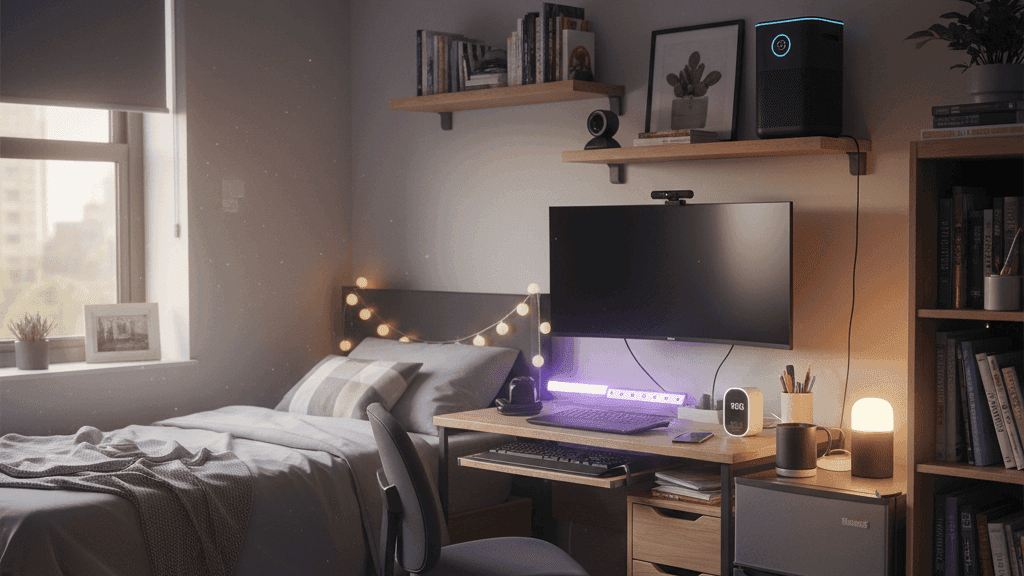
10 Smart Gadgets Every College Dorm Room Needs in 2025

My first dorm room had approximately eight square metres of personal space, one overhead light that made everything look like a crime scene, and three electrical outlets that had to power everything I owned. My roommate kept opposite hours to me and apparently could not feel cold, so the window was always open in winter. I slept badly for most of that first year and spent the second year figuring out which purchases actually helped and which were optimistic nonsense.
This list is the result of that process. Not ten things that sound impressive in a YouTube setup tour, but ten things that make a small shared room meaningfully more livable, most of which cost less than a single textbook and all of which you can pack up and take with you when you move.
1. Smart LED Strip Lights
Dorm room lighting is designed, apparently, to make you feel mildly unwell at all times. The overhead fluorescent or single ceiling fitting does not distinguish between the different things a room needs to be: a study space, a sleeping space, a social space. Everything happens under the same harsh light at the same intensity.
Smart LED strips stuck to the underside of a desk, behind a monitor, or along a bed frame change this completely. You can set them to bright neutral white for studying, dim warm light for winding down in the evening, or whatever your preference is for hanging out with people in the room. The Govee RGBIC strips and the TP-Link Tapo L930 are both reliable and cost a reasonable amount for a full set.
The adhesive backing peels off walls and furniture cleanly, which matters when you move out and the housing office checks for damage. Put them on the furniture rather than the walls to be safe, and check your housing rules before buying, as some universities have restrictions on LED strips for reasons that are never fully explained.
2. A Small Smart Speaker
A voice assistant in a dorm room earns its space primarily as a multi-alarm device and a hands-free control point for everything else.
The reason multi-alarm matters: a dorm room is not like your childhood bedroom. Other people are making noise at odd hours, your sleep is frequently disrupted, and getting up for a 9 AM lecture after being awake at 2 AM is a specific and unpleasant kind of tired. Being able to say "set five alarms between 7:30 and 8" without configuring anything on a phone is genuinely useful. Setting a timer for ramen or laundry without having to stop what you are doing matters in a small space where everything is close together.
The Amazon Echo Pop is the obvious recommendation for this context. It is designed to be compact, sounds adequate for a small room, and costs less than most other options. The Google Nest Mini is the equivalent for Google ecosystem users. Either one handles the practical daily needs of dorm life without taking up significant space.
3. A Smart Power Strip
Dorm rooms have too few outlets. Everything you own needs power. A smart power strip addresses both problems simultaneously.
A strip like the Kasa EP25 or the TP-Link power strip gives you six outlets and USB ports from one wall plug, with the added ability to schedule and individually switch each outlet from an app. Practical applications: the phone charger switches off automatically after a set time rather than drawing power all night. The desk lamp and speaker cut off when you leave the room. A morning routine switches the kettle plug on before your alarm goes off.
The smart features on a power strip are more useful than on individual plugs because the strip is where everything concentrates in a small room. One device to manage, one app, all your essentials covered.
4. Noise-Cancelling Earphones or Headphones
Shared dorms are loud in ways and at hours you cannot predict or control. A roommate who FaceTimes at midnight, people in the corridor at 2 AM, the person downstairs who apparently does all their exercise in the middle of the night: none of this is negotiable and all of it affects your ability to sleep, study, or simply have a quiet moment.
Active noise cancellation technology has improved significantly at accessible price points in the past few years. The Sony WH-1000XM5 is the benchmark for over-ear headphones. For earbuds, the Sony WF-1000XM5 and the Nothing Ear are both strong options at prices that are more manageable for students. The specific brand matters less than buying from a manufacturer with a reliable track record rather than an unknown brand with impressive numbers on the box.
For sleeping specifically, standard earbuds are uncomfortable to lie on. Purpose-designed sleep headphones, which are soft fabric headbands with flat drivers, are worth investigating if nighttime noise is the primary problem you are trying to solve.
5. A Bluetooth Speaker for Music in the Room
Laptop speakers and phone speakers do not produce music. They produce a thin approximation of music that is fine for checking whether a song exists and not fine for listening to it. For a room where you spend significant time, a small Bluetooth speaker is a meaningful quality of life investment.
The JBL Flip 6 is the standard recommendation in this category: waterproof for bathroom use, loud enough to fill a dorm room comfortably, with battery life that goes well beyond a day of casual listening. It is not cheap but it is durable, sounds significantly better than its size suggests, and takes the kind of treatment that student life involves.
If the Flip is too expensive, the JBL Go series and the Anker Soundcore Motion lines both produce genuinely good sound at lower prices. The waterproofing is less robust but the audio quality is adequate for the use case.
6. A Smart Plug for the Kettle
If you drink tea or coffee and keep a kettle in your room, a smart plug on the kettle is the most immediately satisfying small purchase on this list.
The specific routine worth setting up: the smart plug switches on five minutes before your alarm goes off, so the kettle is boiled and ready when you get up rather than requiring you to wait for it while you are already running late. In combination with a voice assistant, you can also say "turn on the kettle" from bed without getting up, which is exactly the kind of minor convenience that turns out to matter significantly on cold mornings.
Any smart plug compatible with your voice assistant works for this. Kasa, Meross, and TP-Link Tapo are all reliable. The whole setup costs less than a week of coffee shop visits and pays for itself immediately.
7. A Sunrise Alarm Clock or Smart Bulb Sunrise Routine
Being woken by a sudden alarm sound is physiologically unpleasant in a way that affects how you feel for the first hour of your day. A sunrise alarm clock, which gradually brightens over twenty to thirty minutes before your alarm time, wakes you through the body's natural light-response mechanisms rather than through auditory shock.
The Philips Wake-Up Light is the established option in this category. Placed on a nightstand at the right distance, it reliably wakes people who could sleep through conventional alarms, and the transition from sleep to wakefulness is noticeably less jarring.
The equivalent for someone who already has smart bulbs: most smart bulb systems allow you to create a wake-up routine that slowly increases brightness from zero over a set period. It does not require a separate device if the bulb is close enough to where you sleep. The Philips Hue app and Alexa both support this as a built-in feature.
For shared rooms, this approach is more considerate to a roommate than an audible alarm, which is a secondary but real benefit.
8. A Smart Scale
This sounds like the most unnecessary item on this list and turns out to be one of the most consistently used.
A kitchen scale that syncs with a nutrition app addresses the specific problem of not knowing how much of something you are eating, which for students living independently for the first time often results in either significantly over- or under-eating without realising it.
The Renpho Bluetooth scale connects to the Renpho app and various third-party nutrition platforms. You weigh ingredients, scan barcodes, and the nutritional breakdown is calculated automatically without manual entry. For anyone managing their food intake, this removes enough friction that the tracking actually happens consistently rather than being abandoned after a week.
It also improves cooking for one. When a recipe serves four and you are cooking for yourself, knowing precise gram measurements rather than estimating a quarter of the visual recipe helps significantly.
9. A Small Camera for the Room Entrance
This is the suggestion that gets the most skeptical reactions and the one people seem most surprised to find useful after they try it.
A small camera like the Wyze Cam or the Blink Mini pointed at the door from inside the room, or at the entrance to a suite from a shared common area, provides motion notifications when someone approaches. For students who have had possessions taken from rooms, this provides both footage and, more practically, a deterrent. For anyone who has ever come back to their room to find the door not properly closed, remote visual confirmation is genuinely reassuring.
The important constraint: only point cameras at shared spaces or your own door entrance, never at a roommate's personal space, and talk to your roommate about it before installing. This is a security measure, not surveillance, and the distinction matters both ethically and for the practical reason that a roommate who is not informed about a camera will reasonably find it alarming.
10. A Portable Monitor
For anyone who does serious work at a desk, which at university means most people during most of the year, a second screen changes the working experience significantly.
Switching between tabs is cognitively more demanding than it appears. The research notes are in one window, the essay is in another, the source material is in a third. Having two screens eliminates most of the switching and makes sustained focused work meaningfully easier. This applies as much to following a lecture recording while taking notes as it does to writing a paper.
The ASUS ZenScreen is the established portable monitor recommendation in this category. It is powered through USB from the laptop so no additional cable is required, folds flat to roughly the thickness of a textbook, weighs under a kilogram, and produces good enough image quality for text work and video. When not in use it stores against a wall or under a bed without occupying meaningful space.
The investment is meaningful but it is also something you will use for the entire time you are in education and likely beyond.
The Practical Part
You do not need all of these and you certainly do not need all of them at once.
The items with the highest return on daily experience are the LED lighting, the noise-cancelling audio, and whichever power management solution matches your specific outlet situation. Those three affect the quality of your time in the room every single day.
The smart speaker, smart plug, and sunrise alarm are the next tier: small purchases that compound over months through daily convenience.
The scale, camera, and portable monitor are situation-dependent: genuinely useful for certain people and optional for others depending on how you work and what your specific frustrations are.
Buy one or two things that address your most immediate problems. Give them a few weeks. Decide from actual experience rather than optimistic theory what you want to add next.
Everything on this list is portable and useful beyond the dorm. None of it becomes useless when you graduate. That is the standard every purchase for a shared room should be held to.
